
To minimize productivity loss during relocation, lock in three things before anything else: a dedicated relocation coordinator (Movecraftmoving recommends pairing this with a vetted moving partner), a pre-provisioned IT environment at the destination, and a phased or after-hours move schedule. Research shows that 67% of employees find office moves difficult, and organizations that plan well in advance report higher satisfaction than those that rush. Companies offering comprehensive relocation support recover productivity 23% faster post-move.
Start here:
- Appoint a relocation coordinator with authority to make day-of decisions
- Order internet circuits 4–6 weeks before move day (ISPs need that lead time)
- Pre-configure the destination network before any hardware ships
- Schedule physical moving during off-hours or weekends to protect business hours
- Communicate the full timeline to staff at least 30 days out
- Build a 10–15% time buffer into every major milestone
Table of Contents
- How do you build a relocation timeline that reduces downtime?
- What IT steps actually prevent system downtime during a move?
- Who should own what during a relocation?
- How should you pack and label to speed up re-setup?
- What should you confirm with every vendor before move day?
- Does spending more on planning actually reduce productivity loss?
- How does the approach change for small businesses, remote workers, and home moves?
- Movecraftmoving handles the coordination so you don’t have to
- Key Takeaways
- The part most relocation guides skip
- Research sources and further reading
How do you build a relocation timeline that reduces downtime?
The planning window is the single biggest lever you control. A commercial moving timeline built around clear go/no-go gates prevents the scramble that costs the most hours.
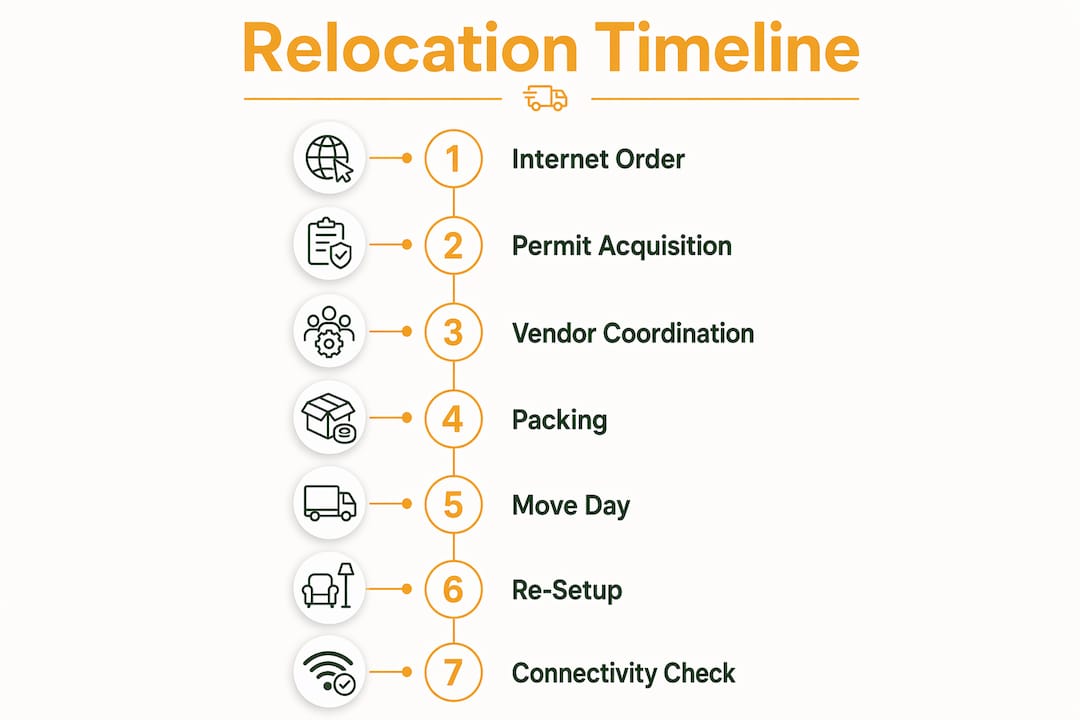
- 12+ months out: Finalize lease, permits, and floor plan. Issue RFPs for movers, IT specialists, and furniture installers.
- 8–12 weeks out: Sign vendor contracts, order internet circuits, and confirm elevator/loading-dock reservations. Assign department move leads.
- 3–7 weeks out (risky zone): If you are starting here, cut scope. Prioritize core services and accept that some staging will happen post-move.
- 2 weeks out: Distribute packing supplies, confirm all vendor arrival windows in writing, and run a full IT backup.
- Move week: Daily coordinator check-ins. Confirm Day-0 deliverables: internet live, core switches online, phones forwarded.
- Day 0: IT team on-site before movers arrive. Verify connectivity before staff enter the new space.
- First 30 days: Weekly check-ins to catch ergonomic, connectivity, and workflow issues before they compound.
| Milestone | Lead Time Needed | Owner | Buffer |
|---|---|---|---|
| Internet circuit order | 4–6 weeks | IT Lead | +1 week |
| Elevator/dock reservation | 3–4 weeks | Facilities | +3 days |
| Mover contract signed | 6–8 weeks | Coordinator | +1 week |
| Permit applications | 4–8 weeks | Facilities/Legal | +2 weeks |
| Full IT backup | 2 weeks before | IT Lead | None — hard deadline |
| Staff communication sent | 30 days before | HR/Coordinator | None |
Pro Tip: Add a 10–15% time buffer to every milestone. A single delayed permit can cascade into a missed mover window and a week of lost productivity.
What IT steps actually prevent system downtime during a move?

Pre-configure the destination network before a single piece of hardware leaves the old site. That one rule prevents most of the cascading failures that turn a two-day move into a two-week recovery.
The sequence that works, per CrownTECH’s IT relocation guidance:
- Order the internet circuit 4–6 weeks in advance and confirm activation date in writing.
- Inventory all IT assets by role, not physical location. A device’s function determines its place in the startup sequence.
- Export configurations for all core switches, firewalls, and routers before disassembly.
- Build a dependency tree: map which systems must be online before others can start.
- Derive a shutdown sequence (old site) and a startup sequence (new site) from that dependency tree.
- Pre-configure core switches, VLANs, and VPN tunnels at the new location.
- Test cloud access and critical applications from the new site before move day.
- Run staged restores and set go/no-go checkpoints: if the test fails, the hardware does not move.
For IT relocation planning at scale, bring in an IT relocation specialist. The cost is almost always less than the cost of a failed reconnection.
Pro Tip: Lock your ISP to a specific activation date in the contract, not a window. “Week of” is not a Day-0 deliverable.
- Confirm SLAs with ISP, telephony provider, and any data-center logistics vendors
- Schedule a post-move verification window: 2–4 hours after reconnection before staff arrive
- Keep old-site connectivity live for 48–72 hours as a fallback
Who should own what during a relocation?
Designate a relocation coordinator with clear authority, then assign four supporting owners: IT lead, facilities lead, HR/employee liaison, and vendor point-of-contact. Ambiguity about who decides what is the fastest way to lose hours on move day.
Role responsibilities:
- Relocation coordinator: Owns the master timeline, runs daily standups during move week, and has sign-off authority on go/no-go decisions. See what this role covers in detail.
- IT lead: Owns all technical milestones, vendor SLAs with ISP and telephony, and the startup sequence.
- Facilities lead: Handles permits, elevator bookings, loading-dock scheduling, and furniture installation sequencing.
- HR/employee liaison: Manages staff communication, collects concerns, and coordinates flexible work arrangements during the transition.
- Vendor point-of-contact: Single person who fields all mover, installer, and supplier questions. Keeps the coordinator’s calendar clear.
Communication cadence matters as much as the roles. Pre-move briefings at 30 days and 7 days, daily updates during move week, a Day-0 “we’re live” message, and 30/90-day check-ins keep staff informed and reduce the distraction that 30% of employees report as their top move-related productivity drain.
Pro Tip: Write a one-page escalation runbook before move week. List three triggers: connectivity failure, missing shipment, and labor shortage. Name who calls whom and who has rollback authority. Distribute it to all five role owners.
Simplifying your relocation policy and consolidating vendors cuts exception requests, which are the largest source of coordinator workload. Fewer exceptions mean the coordinator stays focused on the move, not on approvals.
How should you pack and label to speed up re-setup?
Label by function and re-setup priority, not by room. A box labeled “Server Room / Priority 1 / IT Lead” gets unpacked before a box labeled “Conference Room B.”
Labeling scheme: Color code by department, add a numeric priority (1 = unpack first), and include the owner’s name. Every box also gets an “open-first” flag if it contains items needed within the first two hours.
Open-first boxes should contain:
- IT kits: cables, keyboards, mice, monitors, power strips
- Meeting-room tech: conferencing equipment, remote controls, adapters
- Office essentials: staplers, pens, phone chargers, coffee supplies
A long-distance moving inventory checklist helps track chain-of-custody for sensitive documents and equipment. For high-value or regulated items, photograph contents before sealing and note serial numbers.
Staging timeline after movers depart:
| Window | Priority Tasks |
|---|---|
| Immediate (0–2 hours) | IT team verifies connectivity; open-first boxes unpacked at critical desks |
| 24 hours | Meeting rooms tested; phones and printers online; staff workstations operational |
| 72 hours | Remaining furniture placed; storage organized; ergonomic adjustments made |
Reserve a dedicated unpack team for the first 24 hours. Staff trying to unpack their own desks while also doing their jobs lose productivity on both fronts.
What should you confirm with every vendor before move day?
Get written confirmation of arrival windows, equipment-handling procedures, and proof-of-delivery from every vendor. Verbal agreements do not hold up when a mover arrives two hours late and the IT crew has already left.
Vendor questions checklist:
- Proof of insurance and valuation coverage for high-value items
- Specific equipment-handling protocols for servers, monitors, and sensitive hardware
- Elevator and loading-dock booking confirmation (in writing, with a backup window)
- Workforce contingency plan if a crew member calls out
- Claims process and timeline if something is damaged
Sample run-of-move sequence:
- IT crew arrives 2 hours before movers to verify destination network is live
- Movers begin loading at old site; facilities lead supervises
- First truck arrives at new site; IT crew receives and stages hardware
- Furniture installers complete workstations while IT reconnects equipment
- Coordinator runs a 30-minute verification walk: connectivity, phones, printers
- HR sends “we’re live” message to all staff
For a full vendor coordination checklist, including contract language for valuation coverage and SLA terms, Movecraftmoving’s resource page covers the specifics. Review licensed mover contract best practices before signing anything.
Also check the office relocation planning checklist for a task-sequencing reference that complements your vendor run-of-move.
Does spending more on planning actually reduce productivity loss?
Yes, and the math usually favors it. More planning time and selective spending on IT specialists, after-hours moving, and phased moves typically reduce total productivity loss even when upfront costs are higher. Comprehensive relocation support correlates with 23% faster productivity recovery, and organizations that plan 12+ months out report 31% higher satisfaction.
| Approach | Typical Disruption | Added Cost Categories |
|---|---|---|
| Lean (minimal planning, single-day move) | 5–10 business days of disruption | Low upfront; high recovery cost |
| Balanced (8–12 weeks, phased IT, after-hours move) | 2–4 business days | Moderate: IT specialist, weekend crew |
| Premium (12+ months, full managed services, phased move) | Under 1 business day | Higher upfront; lowest total cost |
The lean approach looks cheaper until you count the hours lost to connectivity failures, staff confusion, and re-setup delays. Phased moves by department eliminate full-shutdown risk but require more calendar time and careful cross-team scheduling. Weekend and after-hours moves protect business hours entirely.
How does the approach change for small businesses, remote workers, and home moves?
The productivity-first framework scales down. The priorities shift, but the core logic stays the same: protect your ability to work first, then move everything else.
Small businesses:
- Move one department at a time to keep partial operations running
- Outsource vendor coordination to a managed moving service rather than assigning it to an employee who also has a day job
- Prioritize internet and phone connectivity above all physical setup tasks
Remote workers:
- Arrange a short-term mobile hotspot plan as a connectivity backup during the move window
- Set clear expectations with clients and managers: communicate blackout windows at least two weeks ahead
- Test home-office connectivity at the new address before the official move date if possible
Home moves with a home office:
- Pack a “workbox” last and unpack it first: laptop, chargers, headset, router, and any physical files needed within 48 hours
- Stage your home office before tackling any other room
- Full-service relocation options handle packing and staging so you can stay focused on work through the transition
For households using East Coast storage solutions during a move, staging non-essential items in short-term storage keeps the new space clear for immediate work setup.
Movecraftmoving handles the coordination so you don’t have to
Relocation project management is the part most businesses underestimate. Movecraftmoving provides end-to-end coordination: a dedicated project manager, a vetted vendor network, IT liaison services, and flexible after-hours scheduling. Every partner in the Movecraftmoving network is vetted for integrity, performance, and consistency, which means you are not vetting movers, ISPs, and installers separately while also running your business.

The practical difference: Movecraftmoving owns the vendor run-of-move, the escalation calls, and the Day-0 verification walk. You get a single point of contact instead of five vendor phone numbers. For businesses that need IT-specific support, the data center relocation service covers pre-provisioning, startup sequencing, and post-move verification. For a full picture of what a managed move looks like, the business relocation strategy guide walks through every phase. Ready to plan your move? Contact Movecraftmoving at movecraftmoving.com to get a timeline and coordinator assigned to your project.
Key Takeaways
Starting early and assigning clear ownership are the two actions that most reliably reduce downtime during a move — everything else follows from those two decisions.
| Point | Details |
|---|---|
| Appoint a coordinator first | One person with decision authority prevents the confusion that costs the most hours on move day. |
| Pre-provision IT before hardware ships | Configure the destination network, VLANs, and VPN tunnels before any equipment leaves the old site. |
| Plan 12+ months out when possible | Organizations that allow 12+ months report 31% higher satisfaction than those that rush the timeline. |
| Schedule moves off-hours or in phases | Weekend and after-hours moves protect business hours; phased moves eliminate full-shutdown risk. |
| Movecraftmoving manages the whole process | End-to-end coordination, vetted vendors, and IT liaison services reduce recovery time significantly. |
The part most relocation guides skip
Most relocation advice focuses on the physical move. Pack carefully, label boxes, hire good movers. That is all correct and none of it is where most productivity loss actually happens.
The real losses come from three places: the weeks before the move when staff are distracted and planning is incomplete, the 48–72 hours after move day when connectivity is unstable and no one knows where anything is, and the 30 days after that when small friction points compound into permanent workflow changes. A conference room that never gets properly set up becomes the room nobody uses. A shared drive that gets reorganized during the move becomes the drive nobody can navigate.
The productivity-first approach treats the move as a project with a defined recovery window, not an event with a single end date. That means post-move check-ins are not optional. They are the mechanism that catches the small failures before they become permanent ones. Movecraftmoving builds that review period into every engagement because the move is not done when the truck leaves.
Research sources and further reading
The findings in this guide draw from the following sources:
- How businesses can minimize downtime during office relocation — AZ Big Media
- How to Avoid IT Downtime During an Office Move — CrownTECH
- How to Plan an Office Move With Minimal Downtime — Abel Truck Hire
- Employee Relocation Programs That Actually Work — Pinpointe
- Office Relocation Planning Checklist for Business Owners — AtlanticStar Group
- IT Relocation Planning: A Complete Guide for Organizations — AtlanticStar Group
For deeper guidance, Movecraftmoving’s internal resources cover the commercial moving timeline, vendor coordination checklist, and employee communication protocols in full detail.
Recommended
- Business Relocation Strategy: A Step-by-Step Guide – Move Craft Moving Solutions LLC
- The Role of Employee Communication During Relocation – Move Craft Moving Solutions LLC
- East Coast Storage Solutions During Relocation: 2026 Guide – Move Craft Moving Solutions LLC
- Data Center Relocation Service: What IT Leaders Must Know – Move Craft Moving Solutions LLC