
A data center relocation service is a specialized process that manages the secure physical move of IT infrastructure from one facility to another, with the primary goal of maintaining data integrity and minimizing operational downtime. The industry term is “data center relocation,” distinct from “data center migration,” which refers to shifting workloads or applications to cloud environments. A professional relocation covers four core phases: site auditing, secure packing and transport, reinstallation, and post-move validation. These moves carry real risk. Multiphase relocation processes use four or more chain-of-custody control points to protect hardware from physical stress and prevent asset loss. For IT managers and business leaders, understanding this service is the first step toward executing a move that does not cost you uptime, compliance standing, or hardware.
What is data center relocation service, and what does the process involve?
A professional data center relocation service follows a structured sequence of phases, each designed to reduce risk at a specific point in the move. Skipping any phase compounds risk at every step that follows.
Phase 1: Site audit and asset discovery. Before a single cable is unplugged, a thorough audit catalogs every server, switch, storage array, and power unit. This creates the asset register that drives every downstream decision.

Phase 2: Dependency mapping and shutdown sequencing. Dependency mapping of hardware and application interrelations prevents outages by ensuring systems power up in the correct order after the move. Skipping this step is the leading cause of post-move failures, making it the most underestimated task in the entire process.
Phase 3: Specialized packing and secure transport. Equipment moves in climate-controlled, ESD-safe (electrostatic discharge-safe) vehicles. Antistatic packaging protects circuit boards from static damage, while temperature controls prevent thermal stress on storage media.
Phase 4: Reinstallation, configuration, and validation. At the destination, technicians rack equipment according to the pre-approved layout, reconnect cabling, and run validation tests before any system goes live. This phase confirms that every device performs as expected in the new environment.
Phase 5: Chain-of-custody documentation. Chain-of-custody tracking with four or more control points covers origin pickup, transport handoff, arrival at the new facility, and final rack handoff. This documentation provides traceability for post-move troubleshooting and accountability for high-value assets.
Pro Tip: Build your data center migration checklist around these five phases. Any vendor proposal that omits dependency mapping or chain-of-custody documentation is a red flag.
What are the main data center relocation strategies?
Two primary strategies govern how organizations execute a physical data center move. Choosing the wrong one for your situation creates avoidable risk or unnecessary cost.
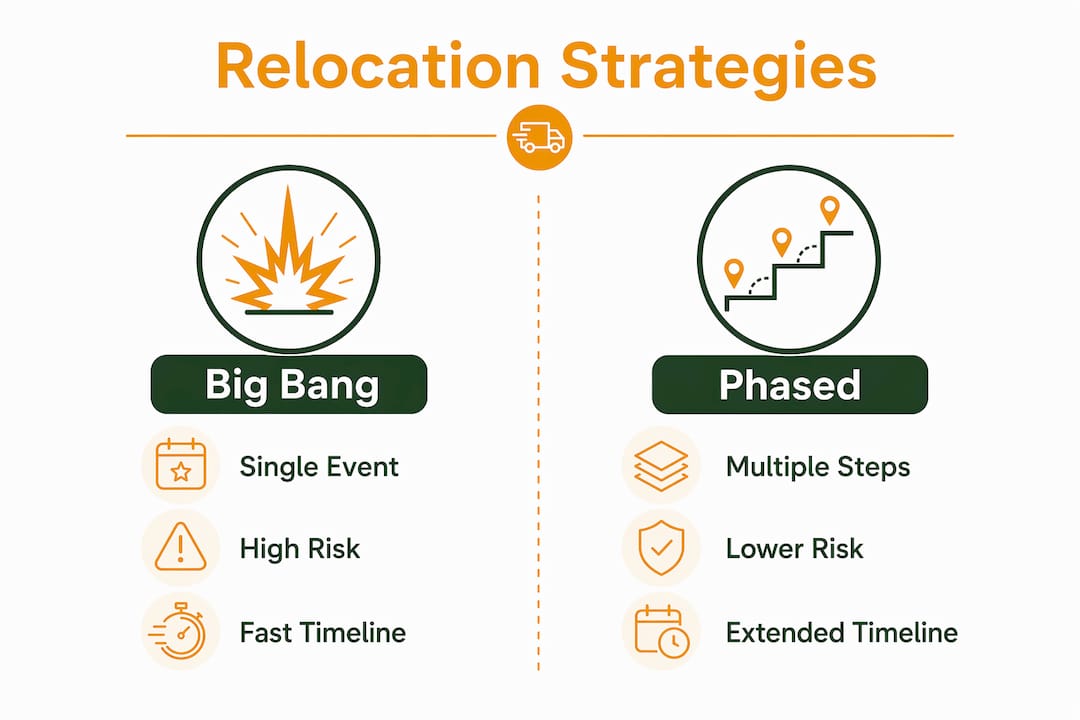
Two primary relocation strategies exist: the Big Bang approach and the Phased approach. Each carries distinct trade-offs across downtime, resource demand, and operational risk.
| Feature | Big Bang | Phased |
|---|---|---|
| Move timeline | Single event, compressed | Extended over weeks or months |
| Downtime window | One concentrated outage | Multiple smaller windows |
| Operational risk | Higher during move window | Lower per event, spread over time |
| Resource demand | Intensive but short-term | Sustained over longer period |
| Best for | Smaller environments, hard deadlines | Large, complex, or mission-critical infrastructure |
The Big Bang approach moves everything at once. It suits organizations with tight lease deadlines, smaller footprints, or workloads that can tolerate a planned maintenance window. The trade-off is concentration of risk: if something goes wrong, the entire environment is affected simultaneously.
The Phased approach transfers workloads and hardware in planned batches. Each batch moves, stabilizes, and validates before the next begins. This reduces the blast radius of any single failure but demands more coordination, more vendor hours, and a longer project timeline.
- Choose Big Bang when your lease expires on a fixed date and you have a tested rollback plan.
- Choose Phased when you operate mission-critical systems with zero-tolerance downtime requirements.
- Hybrid approaches exist: move non-critical systems via Big Bang, then phase the production environment.
How does data center relocation differ from migration?
Relocation and migration are not interchangeable terms, and treating them as synonyms creates scope confusion that derails projects. Relocation describes moving physical infrastructure, while migration typically means shifting applications or data to cloud environments. This distinction directly affects which vendors you hire, which compliance obligations apply, and how you allocate budget.
A relocation project requires logistics expertise: certified transport, physical security, and hardware handling. A migration project requires application architects, cloud engineers, and data transfer protocols. Many organizations face both simultaneously, for example, moving physical servers to a new colocation facility while also shifting some workloads to AWS or Azure. Conflating the two in a single project scope leads to vendor mismatches and accountability gaps.
Compliance responsibility is a critical point of separation. Leadership must recognize that a physical move does not transfer compliance obligations. Whether you relocate to a colocation facility or migrate to a cloud provider, your organization retains responsibility for maintaining security policies and regulatory requirements such as HIPAA, SOC 2, or PCI DSS. Your vendor handles the truck. You own the compliance posture.
Distinguishing relocation from migration is also the clearest way to prevent scope creep. Define in writing which activities fall under each category before signing any vendor contract.
What are the key benefits of a well-planned data center relocation?
A data center move is not just a logistics event. Treating relocation strategically enables organizations to improve power efficiency, reduce cooling costs, and eliminate the legacy constraints that slow down operations. Organizations that treat the move as a pure lift-and-shift operation miss the most valuable part of the process.
The core benefits of a well-executed relocation include:
- Hardware re-platforming. Moving forces a full audit. Use it to retire underperforming servers and replace them with current-generation hardware that delivers better performance per watt.
- Improved cooling and power distribution. New facilities often support hot-aisle/cold-aisle containment designs that older buildings could not accommodate. Redesigning the layout at the destination reduces cooling energy consumption measurably.
- Cabling and rack organization. Messy cable runs are a maintenance liability. Relocation is the one moment when every cable must be disconnected anyway, making it the natural time to implement structured cabling standards.
- Eliminating zombie servers. Relocation is a prime opportunity to audit cabling and eliminate zombie servers, which are physical machines consuming power and rack space while running no productive workloads. Failure to remove them replicates the same inefficiencies in the new facility.
- Long-term cost reduction. A leaner, better-organized environment costs less to operate, cool, and maintain. The upfront investment in a thorough relocation pays back through lower monthly operating expenses.
Pro Tip: Create a “do not move” list during your asset audit. Any server that cannot justify its power draw or workload should be decommissioned before the move, not after.
How to prepare for and select the right data center relocation service
Selecting the right provider for data center moving services requires more than comparing price quotes. The quality of planning and vendor expertise determines whether your organization experiences a controlled transition or an extended outage.
-
Conduct a detailed infrastructure audit. Document every asset, its location, its dependencies, and its criticality level. This audit becomes the foundation for your data center migration checklist and your vendor’s project plan.
-
Evaluate vendor expertise specifically in physical relocations. Ask providers for references from moves of similar scale and complexity. Confirm they use ESD-safe transport, climate-controlled vehicles, and certified technicians for rack and stack work.
-
Assess service comprehensiveness. The best providers handle the full scope: pre-move planning, physical transport, reinstallation, and post-move support. Providers who hand off responsibility at the loading dock create accountability gaps.
-
Build a risk management and contingency plan. Define rollback procedures for each phase. Identify which systems require failover capacity during the move window. Confirm that your provider has tested these procedures on previous projects.
-
Coordinate internal stakeholders early. IT teams, facilities managers, security officers, and business unit leaders all have a stake in the move timeline. Misaligned expectations between these groups are a common source of delays.
-
Confirm post-move support terms. The 48 hours after a relocation carry the highest risk of configuration errors and hardware failures. Your provider should offer on-site or on-call support during this window as a standard deliverable, not an add-on.
The data center relocation process succeeds when the vendor and the internal team operate from the same documented plan, with clear ownership at every phase.
Key Takeaways
A data center relocation service requires structured planning, dependency mapping, and chain-of-custody documentation to protect infrastructure and maintain compliance throughout the move.
| Point | Details |
|---|---|
| Define scope precisely | Separate physical relocation from cloud migration before selecting vendors or allocating budget. |
| Dependency mapping is non-negotiable | Map hardware and application dependencies before shutdown to prevent post-move outages. |
| Choose strategy by risk tolerance | Use Big Bang for speed and fixed deadlines; use Phased for mission-critical, complex environments. |
| Relocation is an optimization event | Audit, decommission zombie servers, and redesign cooling layouts during the move, not after. |
| Compliance stays with you | Moving to a colocation or cloud facility does not transfer your regulatory obligations to the vendor. |
Why most organizations underestimate what a data center move actually demands
Most IT leaders I have spoken with approach a data center relocation the same way they approach an office furniture move: get a truck, get a crew, get it done. That mindset is where projects go wrong.
The physical transport is the easiest part. The hard work is the 6–8 weeks of pre-move planning: the dependency maps, the shutdown sequences, the asset registers, and the contingency plans. Organizations that skip or rush this phase consistently face the same post-move problems: systems that boot in the wrong order, cables that connect to the wrong ports, and compliance audits that reveal undocumented assets.
The second mistake I see repeatedly is treating the move as a neutral event rather than a strategic one. Every piece of hardware you move is a piece of hardware you chose to keep. That choice deserves scrutiny. A relocation that eliminates 20% of your zombie server load and redesigns your cooling layout is not just a move. It is an infrastructure upgrade that pays for itself over the following 24 months.
The organizations that get this right treat the relocation project the same way they treat a major software deployment: with a project manager, a risk register, a rollback plan, and a post-move review. The ones that treat it as a facilities task end up back in the same conversation six months later, wondering why the new facility has the same problems as the old one.
— Info
How Movecraftmoving supports your next data center move
Movecraftmoving connects IT managers and business leaders with rigorously vetted logistics professionals who specialize in the secure transport and reinstallation of physical data center infrastructure.

Every move Movecraftmoving coordinates is built around radical transparency and documented accountability at every phase, from the initial site audit through post-move validation. The carriers and technicians in the Movecraftmoving network use climate-controlled transport, ESD-safe packing, and chain-of-custody documentation as standard practice, not optional upgrades. If your organization is planning a facility transition and needs a partner who treats your infrastructure with the same care you do, explore Movecraftmoving’s solutions to see how a controlled, well-documented relocation is built from the ground up.
FAQ
What is a data center relocation service?
A data center relocation service manages the secure physical move of IT infrastructure, including servers, storage, and networking equipment, from one facility to another. The service covers planning, packing, transport, reinstallation, and post-move validation to minimize downtime and protect data integrity.
How long does a data center relocation take?
Timeline depends on the scale and strategy chosen. A Big Bang move for a small environment can complete in a single weekend, while a Phased relocation for a large enterprise may span several weeks or months.
What is the difference between data center relocation and migration?
Relocation moves physical hardware to a new location. Migration shifts applications or data to a cloud or virtual environment. Both may occur simultaneously, but they require different vendors, skills, and compliance considerations.
What should a data center migration checklist include?
A thorough checklist covers asset inventory, dependency mapping, shutdown sequencing, packing and transport protocols, reinstallation procedures, chain-of-custody documentation, and a post-move validation plan.
Who is responsible for compliance during a data center relocation?
Your organization retains full responsibility for security policies and regulatory compliance, such as HIPAA, SOC 2, or PCI DSS, regardless of whether you move to a colocation facility or a cloud environment. The relocation vendor handles physical logistics, not your compliance posture.