
Default to unloading racks unless you have certified, weight-rated lifting equipment and a documented safety plan. Before anything else, verify every backup restores cleanly and confirm the destination site can handle full power and cooling load. For high-value or complex environments, bring in qualified data center movers rather than treating this like a standard office relocation.
TL;DR:
- Moving fully loaded racks is unsafe unless the equipment is rated for that weight and stability, as improper handling can cause damage and warranty issues.
- Pre-move testing of electrical load capacity and HVAC cooling is critical to avoid capacity shortfalls and temperature-related failures after installation.
- Specialized equipment like powered rack tugs and hydraulic lifts should be used instead of general warehousing tools to prevent rack damage during transportation.
- Establishing a detailed inventory, clear roles, and coordinate logistics such as elevator reservations and insurance is essential to prevent delays and mishaps.
- Validating the installation through systematic power, network, and environmental checks ensures a smooth functional startup and minimizes support issues later.
Table of Contents
- Server Rack Moving Planning: The Pre-Move Checklist
- Should You Move Fully Loaded Racks or Unload Them First?
- What Equipment Do You Need to Transport Server Racks?
- How Do You Prepare the Destination Site Before the Racks Arrive?
- How Do You Validate a Server Rack After Reinstallation?
- How Move Craft Coordinates Data Center Relocations
- Outsourcing vs. In-House: How I’d Weigh the Decision
- Move Craft’s Data Center Relocation Service: What We Coordinate
- Sources
Server Rack Moving Planning: The Pre-Move Checklist
A rushed server relocation is how a weekend project turns into a three-day outage. Most guides recommend starting 4 to 6 weeks out for a standard move and 8 to 12 weeks for complex, multi-rack environments. That window gives you time to catch problems on paper instead of in a hallway with a loaded cart.
Build the inventory first, because everything else depends on it:
- Document every asset: serial number, rack unit (RU) position, weight, and a photo of the front and rear panel.
- Assign named owners for shutdown, packing, transport, and post-move verification, with a clear escalation contact if something goes sideways.
- Lock in your maintenance window and run at least one dry rehearsal, including rollback criteria if the move needs to be aborted mid-process.
- Test backups by actually restoring from them, not just confirming a job completed.
- Export configurations from every network device, hypervisor, and virtualization platform before anything gets unplugged.
Beyond the technical work, logistics can quietly sink a move date:
- Reserve the freight elevator and confirm building access hours at both origin and destination.
- Verify insurance coverage for the equipment in transit, and confirm your mover carries its own liability and cargo insurance.
- Coordinate vendor credentials and access badges in advance so nobody is standing in a lobby at 6 AM without clearance.
A vendor coordination checklist helps keep multiple contractors, electricians, and IT staff working from the same document instead of five different email threads.
Should You Move Fully Loaded Racks or Unload Them First?
Here’s the uncomfortable truth: moving a fully populated rack is usually unsafe unless you’re using equipment specifically rated for that weight and stability profile. ServerLIFT’s guidance is blunt about it — without a certified lifting solution, unload the rack. Shock, cable strain, thermal stress from powered-down equipment sitting for hours, and voided warranties are all real outcomes of skipping this step.
Before deciding, run through this checklist:
- Does your moving device carry a weight and stability rating that matches or exceeds the loaded rack?
- Is the rack’s structural frame and attachment points sound, with no existing stress cracks or loose rails?
- Is the full transport path (doorways, elevators, thresholds) clear and measured?
- Does your insurance cover in-transit equipment damage at replacement value?
- What does the manufacturer’s own documentation say about moving that model loaded?
If you proceed loaded, secure the rails, brace individual servers against lateral shift, and use rated wheel locks. If you unload, label both ends of every cable before disconnecting anything, and group components by system so reassembly doesn’t turn into a guessing game.
Pro Tip: Photograph the rack’s cabling layout from three angles before you touch a single connector. It takes two minutes and saves hours during reinstall.
What Equipment Do You Need to Transport Server Racks?
Warehouse forklifts and standard hand trucks are not built for this job, and using them is one of the most common ways racks get damaged in transit. Specialized devices like powered rack tugs, hydraulic lifting jacks, and purpose-built rack lifts exist precisely because standard equipment can’t guarantee stability under a loaded, top-heavy cabinet.
Vehicle selection matters as much as the lifting gear:
- Use enclosed, climate-controlled vans or trucks, holding temperatures roughly between 60 and 80 degrees Fahrenheit.
- Let equipment acclimate to room temperature before powering it back on, especially after cold-weather transport, to avoid condensation on internal components.
- Secure racks with rated straps, blocking at the base, and anti-vibration padding, plus a vertical restraint against tipping during turns or sudden stops.
- Walk the loading path in advance: elevator dimensions, door thresholds, and any floor transitions that could jolt a loaded rack.
Assign a specific person to escort the equipment and confirm handoff at each stage. That single accountability point is what prevents “I thought someone else checked that” moments.
How Do You Prepare the Destination Site Before the Racks Arrive?
Facility managers consistently point to power and cooling readiness as the phase everyone underestimates. Testing circuits under actual load before equipment arrives is not optional if you want to avoid a breaker trip during the first hour of production.
Run these checks before move day:
- Have an electrician test power circuits under simulated load, and verify breaker, panel, PDU, and UPS capacity against your actual draw.
- Plan for 20 to 30 percent headroom above current load when calculating new facility capacity, not just current consumption.
- Calculate BTU output for the incoming equipment and confirm HVAC can meet the new heat load, ideally monitoring temperature and humidity for 24 to 48 hours before arrival.
- Verify raised-floor load ratings, rack anchoring, leveling, and grounding continuity.
- Pre-install and test PDUs and network uplinks, confirming IP addressing, VLAN configuration, uplink bandwidth, and DNS/VPN routing ahead of time.
Statistic Callout: Facilities that skip a pre-move electrical load test are far more likely to discover capacity shortfalls only after equipment is already racked. Testing under load beforehand, rather than after power-up, is the single change that prevents the most avoidable emergency calls on move day.
How Do You Validate a Server Rack After Reinstallation?
Reconnection order matters more than most teams expect. Bring systems up in sequence: UPS and PDU first, then networking, then storage, then compute. Powering everything simultaneously makes it nearly impossible to isolate a fault if one shows up.
- Reconcile the physical inventory against your pre-move documentation and inspect every unit for transit damage.
- Photograph the finished rack elevation for your records before closing anything up.
- Run power and load-balancing checks, confirm network reachability, verify DNS resolution, and run application smoke tests.
- Confirm monitoring and logging tools are receiving data as expected, not just that the dashboard loaded.
- Document any exceptions immediately and keep your rollback plan active until stakeholders formally sign off.
Don’t treat sign-off as a formality. A quiet exception logged on move day is a lot cheaper to fix than a support ticket three weeks later.
How Move Craft Coordinates Data Center Relocations
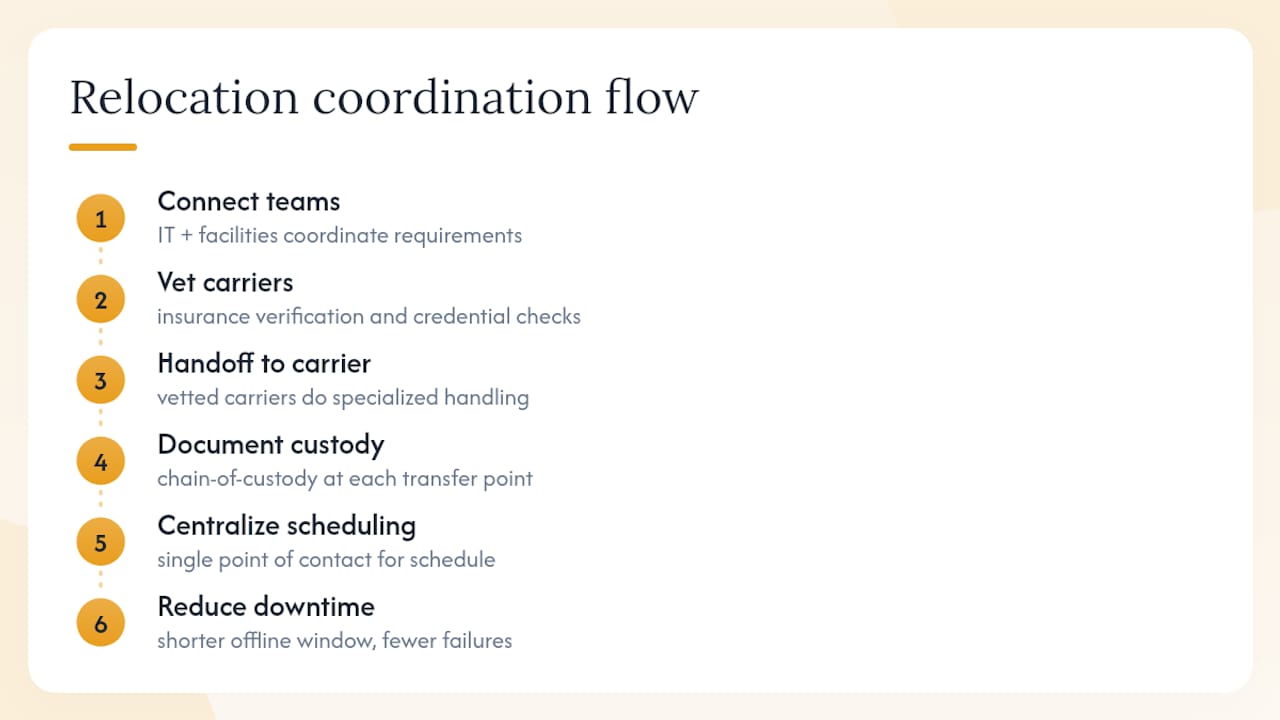
Move Craft connects IT and facilities teams with vetted carriers who specialize in data center and server equipment moves, not general household freight pushed into an unfamiliar category. Every partner carrier goes through insurance verification and credential checks before we hand off a project.
That vetting translates into fewer surprises: certified equipment handling, documented chain-of-custody at every transfer point, and a single point of contact managing scheduling instead of you juggling three vendors and a spreadsheet. The goal is straightforward. Reduce the window where your systems are offline, and reduce the number of things that can go wrong while they’re in transit.
Outsourcing vs. In-House: How I’d Weigh the Decision
Outsourcing earns its cost when the racks are high-value, the timeline is tight, or your team hasn’t moved server equipment before. If you have documented procedures, certified lifting equipment on hand, and generous downtime windows, in-house execution can work fine. Either way, put the decision, the approvals, and the contingency budget in writing before move day.
— Info
Move Craft’s Data Center Relocation Service: What We Coordinate
Server rack moving isn’t a task most facilities teams handle more than once every few years, which is exactly why mistakes happen. Move Craft coordinates the parts that trip people up: vetting carriers with real data center experience, verifying their insurance before they touch your equipment, building the schedule, and managing on-site logistics so your team can focus on the technical handoff instead of chasing vendors.

You get a single point of contact instead of five separate calls, documented chain-of-custody at every handoff, and carriers who’ve actually moved racks before, not just furniture. That combination is what keeps downtime windows short and equipment intact. If you’re planning a relocation with server infrastructure in scope, start with our data center relocation service overview to see how the coordination process works and get a quote built around your timeline.
Sources
- 10 Steps to Successfully Move Server Racks and Cabinets
- Server Room Moving Tips | Complete Guide for IT Relocation 2025
- How To Move a Server Rack – RackLift