
IT equipment moving specialists take technical ownership of the physical move — not just the transport. They are the professionals accountable for infrastructure dependency mapping, ESD-safe packing and de-racking, serialized chain-of-custody tracking, and validated post-move testing. A general commercial mover carries boxes; a specialist carries responsibility for your systems coming back online.
The core responsibilities that matter to IT leaders:
-
Dependency mapping and runbook development — documenting which systems must come down in what order, and in what sequence they must be restored
-
ESD-safe packing and de-racking/re-racking — protecting circuit-level components from static discharge and mechanical stress during disassembly and transit
-
Serialized asset tracking and chain-of-custody logs — photographic condition records, signed custody transfers, and GPS telemetry from origin to destination
-
Post-move validation — power-on checks, network reachability tests, and application smoke tests before the vendor leaves the building
When to hire one: Any move involving server racks, network infrastructure, or regulated data (HIPAA, SOX, PCI-DSS) — or any move where unplanned downtime costs more than a few hours of revenue — warrants a specialist rather than a general commercial mover.
Table of Contents
- What does the role of IT equipment moving specialists actually cover?
- How do specialists plan an infrastructure move before anything ships?
- How do specialists track assets and maintain audit trails?
- What packing and handling procedures protect your equipment in transit?
- What should you expect from secure transport and logistics?
- How do specialists restore connectivity and validate systems after the move?
- What responsibilities do specialists have for decommissioning and data destruction?
- How should project management and communication work during the move?
- What compliance, certifications, and insurance items belong in your SOW?
- What drives cost, and how do you keep the timeline on track?
- How do you choose an IT equipment moving specialist?
- Research insights: what the evidence says about hidden risks
- Key Takeaways
- What most IT leaders get wrong about specialist movers
- Movecraftmoving handles IT equipment moves with the documentation you need
- Useful sources and further reading
What does the role of IT equipment moving specialists actually cover?
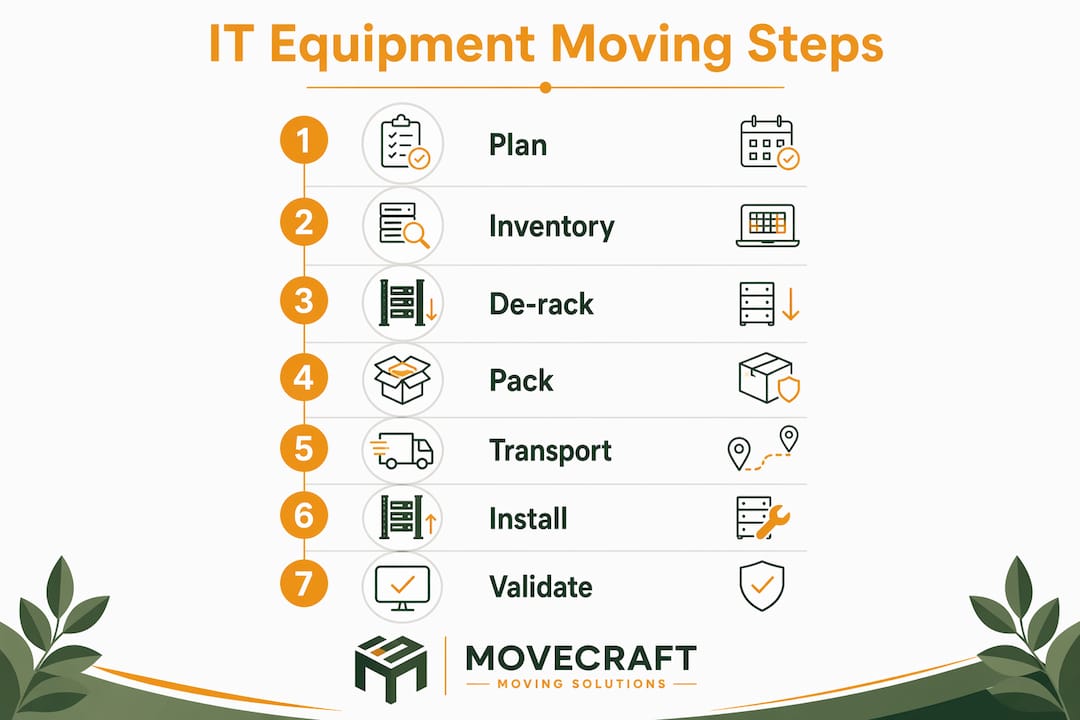
The scope is broader than most IT leaders expect when they first issue an RFP. A qualified specialist typically delivers across seven service areas, each with defined deliverables:
- Infrastructure assessment and planning — pre-move site visits, power and cooling audits, rack elevation surveys, and a written move playbook
- Asset inventory and tagging — serialized labels, photographs, and pre-move condition reports for every device
- Packing and ESD-safe handling — anti-static materials, custom crating, and mechanical safeguards for fragile components
- De-racking and re-racking — structured disassembly with cable labeling, rack jack and server lift equipment, and documented re-installation
- Secure transport — dedicated climate-controlled vehicles with air-ride suspension, GPS tracking, and sealed loads
- Cabling and post-move validation — structured cabling reconnection, port mapping, and system-level testing
- Secure decommissioning and disposal — data erasure or physical destruction with certificates, and R2/RIOS-certified recycling when required
The delivery model for a qualified specialist includes a dedicated project lead, trained technicians (not general laborers), technical lift equipment, and climate-controlled vehicles. What the vendor owns: physical handling, chain-of-custody, and validation sign-off. What internal IT must own: access credentials, application-layer testing, and final production sign-off. Blurring that line is where most post-move disputes start.
How do specialists plan an infrastructure move before anything ships?
Pre-move site visits are where specialists earn their fee before a single rack bolt is touched. A thorough site survey covers power capacity and circuit mapping at both origin and destination, cooling layout and airflow constraints, raised-floor access points and weight ratings, rack elevations and aisle widths, PDU locations, and existing cable routes. Skipping this step is the single most common cause of last-minute scope changes on move day — and scope changes on move day are expensive.
Pre-move site visits that check power, cooling, raised-floor access, rack space, and cable routes prevent costly surprises when the trucks arrive.
Planning phase checklist — request these from any vendor:
- Written infrastructure assessment report with photos
- System dependency map (which systems depend on which, in what order)
- Move playbook / runbook aligned to your change-management windows
- Defined downtime windows with rollback criteria
- Stakeholder notification schedule
Typical planning milestones:
- Initial site survey and infrastructure audit (weeks 1–2)
- Dependency mapping and runbook draft (weeks 2–3)
- Internal IT review and runbook sign-off (week 3–4)
- Pre-move rehearsal for critical systems (week 4–5)
- Move execution within approved change window
- Post-move validation and acceptance sign-off
The runbook is not optional. It is the document that tells every technician, in sequence, exactly what to do — and what to do if something goes wrong. A vendor who cannot produce a draft runbook during the proposal phase is not ready to move your infrastructure.
How do specialists track assets and maintain audit trails?
Serialized tracking is the mechanism that turns a physical move into an auditable event. Every device gets a unique asset tag before it leaves the rack. A photograph documents its pre-move condition. A signed condition report captures any existing damage so there is no ambiguity after transit.

During transport, GPS telemetry and signed chain-of-custody logs are standard specialist practices that materially shorten reconnection troubleshooting time. Knowing exactly where each asset is at every custody transfer also provides the evidence trail auditors and insurers require after a loss.
Sample asset tracking record — require this format in your SOW:
| Asset Tag | Serial Number | Location (Origin) | Pre-Move Status |
|---|---|---|---|
| — | — | Rack 3 | Operational |
| — | — | Rack 3 | Operational |
| — | — | Rack 4, U6 | Flagged — bent rail |
| — | — | Storage shelf B | Decommission queue |
Chain-of-custody documentation paired with GPS telemetry is the most persuasive evidence available for audits and insurance claims after a loss.
Pro Tip: Before the vendor departs the destination site, require a reconciliation check: every asset tag scanned out at origin must be scanned in at destination, with a signed discrepancy report for anything that does not match. Do not accept verbal confirmation.
What packing and handling procedures protect your equipment in transit?
The gap between a specialist and a general mover shows up most clearly in packing. Anti-static (ESD) bubble wrap, ESD foam, and grounded handling protocols are standard for specialist teams. Ordinary bubble wrap and standard packing materials generate static charges that can damage electronics — a risk that is invisible at move time but shows up as premature hardware failure weeks later.

Micro-failures caused by vibration, static, and improper handling — bent pins, micro-fractures in drives — are frequently invisible at move time but cause premature hardware failure. Air-ride vehicles and ESD-safe materials materially reduce that risk.
De-racking vs. moving populated racks
Moving a populated rack is faster but carries real mechanical risk: unsecured components shift under transit vibration, and a rack that tips during loading can destroy an entire chassis. De-racking is recommended when:
- Individual servers or blades are not secured with rail kits
- The rack exceeds safe tipping weight for the vehicle ramp
- Any component is already flagged as fragile or partially seated
Specialists use rack jacks and server lifts to move populated racks safely when de-racking is not practical. Cradle systems and custom crating handle oversized or unusually heavy chassis.
Best practices for fragile components:
- Remove and individually wrap hard drives before transit whenever possible
- Use ESD bags for all loose cards, modules, and memory
- Photograph all cable connections before disconnection
- Secure rack doors and blank panels before moving
- Never stack non-rack equipment on top of rack units in the truck
Pro Tip: Ask your vendor specifically whether they de-rack or move populated racks — and why. A vendor who always moves populated racks without a mechanical justification is cutting time at your equipment’s expense.
What should you expect from secure transport and logistics?
Transport is where general movers most often fall short on IT moves. The controls that matter:
- Air-ride suspension — reduces transmitted vibration to solder joints and spinning media; the default for server and high-density storage transport
- Climate control — maintains temperature and humidity within manufacturer tolerances during transit
- Sealed, dedicated loads — no consolidated freight; your equipment does not share a truck with unrelated cargo
- Real-time GPS tracking — continuous telemetry with custody alerts at every stop
- Tamper-evident seals — applied at origin, verified at destination
On insurance: standard mover liability protection uses weight-based limits that are wholly inadequate for IT assets. A server that weighs 40 lbs and costs $15,000 receives a fraction of its replacement value under weight-based coverage. For IT moves, require declared-value or all-risk cargo coverage with per-item limits, not per-shipment caps.
Insurance callout: The FMCSA’s guidance on liability protection makes clear that standard released-value coverage (based on weight) is the default — and the minimum. For IT equipment, always request a Certificate of Insurance (COI) showing all-risk cargo coverage with declared value per asset, not just per shipment. Confirm the policy covers electronics specifically and ask whether there are exclusions for mechanical or electrical breakdown during transit.
For a deeper look at coverage language, Movecraftmoving’s moving insurance guide breaks down declared-value vs. released-value options in plain terms.
How do specialists restore connectivity and validate systems after the move?
Cabling is where post-move timelines either hold or collapse. Before a single cable is pulled, specialists should complete a port map: every patch cable, fiber run, and power connection labeled at both ends with a unique identifier. That label is what allows a technician at the destination to replug 200 cables in the right ports without a network diagram in hand.
Pre-move cabling requirements:
- Label every cable at both ends with a unique port ID
- Photograph the rear of each rack before disconnection
- Document structured cabling runs and patch panel assignments
- Note any non-standard or custom cable lengths that must be replicated
Post-move validation — require these tests in the SOW:
- Power-on verification for every device (no exceptions)
- Network reachability check (ping, SNMP, or equivalent per device type)
- Application smoke tests for critical workloads
- Redundancy and failover checks (confirm HA pairs, backup links)
- Storage connectivity and volume mount verification
- UPS and PDU load verification
A documented post-move validation window with signed acceptance reduces finger-pointing and shortens recovery time. The vendor should not leave the destination site until the IT lead has signed off on each test category. Any failed test becomes a documented punch-list item with a resolution timeline — not a verbal promise.
What responsibilities do specialists have for decommissioning and data destruction?
Decommissioning is a compliance event, not just a logistics task. Any device that held regulated data — patient records, financial data, cardholder data — requires documented proof of destruction or secure handling before it leaves your control.
Specialist responsibilities in decommissioning:
- Secure erasure using NIST 800-88 compliant methods (overwrite, purge, or destroy) for storage media
- Physical destruction (shredding, degaussing) for media that cannot be reliably erased
- Certificates of destruction (CODs) tied to serialized asset IDs
- Chain-of-custody documentation from decommission through final disposition
- R2 or RIOS-certified recycling or resale partners for end-of-life hardware
Compliance callout: HIPAA Security Guidance from HHS requires covered entities to implement policies for the final disposition of electronic protected health information (ePHI) and the hardware it resides on. SOX and PCI-DSS carry parallel requirements for financial and cardholder data. A certificate of destruction tied to a serialized asset record is the minimum evidence you need to satisfy an auditor. A vendor who cannot produce CODs should not handle regulated hardware.
Vendors who offer resale of decommissioned equipment should provide a written data sanitization report for every device before it changes hands. “We wiped it” is not documentation.
How should project management and communication work during the move?
The single most underrated element of a successful IT move is a single technical coordinator who owns communication across internal IT, facility management, and the moving vendor. When those three groups each have their own point of contact and no one is accountable for the whole, small problems become big ones fast.
The main value of an IT relocation specialist is acting as a single point of coordination that removes friction between internal IT, facility management, and general removal vendors.
What the chain-of-custody record should include:
- Signed custody log at every handoff (origin rack, loading dock, vehicle, destination dock, destination rack)
- Sealed and tamper-evident containers with serial numbers matched to the asset register
- GPS evidence of route and any stops
- Named individuals responsible at each custody transition
- Timestamped photographs at each handoff point
The relocation coordinator role is not ceremonial. It is the position that decides when to escalate, when to pause the move, and when to call the rollback.
Pro Tip: Before the move begins, require the vendor to define a validation window — a specific block of time after physical installation where their technicians remain on-site. Get signed acceptance criteria in writing: what “done” looks like for each system category. If the vendor resists this, that resistance is a red flag.
What compliance, certifications, and insurance items belong in your SOW?
Treat the specialist as a technical contractor, not a logistics vendor. That means specifying deliverables in the SOW with the same precision you would use for a software implementation.
Certifications and trust signals to request:
- Background checks for all technicians who will access your facility
- Industry-recognized safety training (OSHA 10 or equivalent)
- R2 or RIOS certification for any e-waste or decommissioning work
- References from moves of comparable scale and equipment type
- Case studies or documented project histories with similar compliance requirements
COI verification table — minimum acceptable language:
| Item to Verify | Minimum Acceptable Language |
|---|---|
| Coverage type | All-risk cargo, not released-value |
| Coverage basis | Declared value per asset, not per shipment |
| Electronics exclusion | None — confirm electronics are explicitly covered |
| Additional insured | Your organization named as additional insured |
| Liability limit | Sufficient to cover highest-value single asset |
| Mechanical breakdown | Covered during transit, not excluded |
General liability alone is not enough. Confirm the COI covers cargo in transit, not just on-site liability. A vendor who offers only weight-based coverage for a rack of servers is not adequately insured for your risk.
What drives cost, and how do you keep the timeline on track?
The cost of a specialist IT move is almost always lower than the cost of a single major downtime incident caused by improper handling. That said, knowing where costs cluster helps you budget and negotiate.
Common cost drivers:
- De-racking labor (time-intensive; billed by technician-hour)
- Custom crating for oversized or unusually heavy chassis
- Dedicated vehicles vs. consolidated loads
- After-hours or weekend work to meet change-window requirements
- Declared-value insurance premiums for high-value assets
- Secure data destruction and COD documentation
Timeline callout: A typical mid-size server room move (20–40 rack units) runs across five phases: assessment and planning (2–4 weeks), pre-move preparation and labeling (1 week), move execution (1–3 nights within the change window), post-move validation (1–2 days), and punch-list resolution (up to 1 week). Delays cluster most often in the assessment phase (incomplete site access) and the validation phase (undocumented application dependencies).
Practical mitigation tactics:
- Stage the move: relocate non-critical systems first to validate the process before touching production
- Run parallel validation: keep origin systems live until destination systems pass all tests
- Rehearse critical system restores: simulate the post-move startup sequence before move day
- Build buffer into the change window: assume the first night takes longer than planned
A commercial moving timeline for a technology move should be treated as a project plan, not a rough estimate.
How do you choose an IT equipment moving specialist?
Vendor selection is where IT leaders most often make avoidable mistakes — usually by treating the IT move as a procurement exercise rather than a technical engagement.
Vetting checklist:
- Documented experience with your equipment type (rack servers, blade chassis, SAN/NAS, network gear)
- Evidence of serialized asset tracking and chain-of-custody procedures
- COI showing all-risk cargo coverage with declared value per asset
- Background checks for all technicians
- References from moves with comparable compliance requirements (HIPAA, SOX, PCI-DSS)
- Sample runbook or move playbook from a prior engagement
- Written post-move validation procedure with defined acceptance criteria
Interview questions for technical leads:
- Walk me through how you handle a populated rack that cannot be de-racked.
- What ESD protocols do your technicians follow, and how is compliance verified on-site?
- What happens if a device fails a post-move power-on test?
- How do you document custody transfers between your team and facility staff?
- Can you provide a sample chain-of-custody log from a prior move?
Red flags — walk away if you see these:
- Insurance offered only on a weight-based basis with no declared-value option
- No chain-of-custody documentation or unwillingness to provide sample logs
- Technicians described as “experienced movers” rather than trained IT professionals
- Refusal to provide a runbook or perform post-move validation
- No references from moves involving regulated data environments
Movecraftmoving’s data center relocation service covers serialized inventory, COI support, and dedicated technical project leads. When issuing an RFP, request their sample runbook and a reference from a comparable move as part of your standard evaluation.
Pro Tip: Require a vendor coordination checklist as part of the SOW. It forces the vendor to name every subcontractor, define every handoff, and assign accountability before the move starts — not after something goes wrong.
Research insights: what the evidence says about hidden risks
The most expensive IT move failures are not the obvious ones — a dropped server, a lost drive. They are the invisible ones: a micro-fracture in a drive platter that causes a failure three weeks post-move, a RAM module that was reseated improperly and causes intermittent crashes, a static discharge that degrades a NIC without killing it outright.
Statistic callout: Standard mover liability protection defaults to weight-based coverage — a limit structure that leaves high-value IT assets dramatically underinsured. A 40-lb server worth $15,000 receives only a fraction of its replacement value under released-value coverage. Declared-value or all-risk cargo coverage is the only adequate protection for IT equipment in transit.
Air-ride suspension vehicles and shock-absorbent floor systems substantially reduce transmitted vibration. They are the default for high-density storage and server transport, protecting solder joints and spinning media that standard truck suspension would stress over a long haul.
The single-coordinator model has a clear operational rationale: when internal IT, facility management, and the moving vendor each operate independently, small miscommunications compound. A missed power-down sequence, a rack moved before the cable team is ready, a loading dock that was not reserved — each is a minor failure alone, but together they extend downtime by hours. A single technical coordinator who owns the runbook and has authority to pause the move eliminates most of that friction.
Pro Tip: Require vendors to perform reseat-and-test checks for RAM, riser cards, and power supplies before returning devices to production. Many post-move failures are caused by components that were not fully reseated after transit vibration — a five-minute check that prevents a two-hour outage.
Key Takeaways
IT equipment moving specialists reduce downtime, protect compliance, and provide the audit trail that general movers cannot — making them the right choice for any move involving server infrastructure or regulated data.
| Point | Details |
|---|---|
| Serialized tracking is non-negotiable | Require asset tags, photos, and signed chain-of-custody logs for every device before the move starts. |
| Declared-value insurance, not weight-based | Standard mover coverage is inadequate for IT assets; demand all-risk cargo coverage with per-asset declared value in the COI. |
| Post-move validation must be contractual | Require a signed validation window and defined acceptance criteria in the SOW before the vendor leaves the site. |
| Single coordinator reduces downtime | One technical lead who owns the runbook and all vendor communication prevents the compounding miscommunications that extend outages. |
| Movecraftmoving for IT moves | Movecraftmoving provides serialized inventory, COI support, and dedicated technical project leads for data center and server relocations. |
What most IT leaders get wrong about specialist movers
The conventional wisdom is that you hire a specialist IT mover for the equipment. The real reason to hire one is for the documentation. Any competent technician can de-rack a server. Very few vendors will hand you a signed chain-of-custody log, a serialized asset reconciliation report, a certificate of destruction for decommissioned drives, and a post-move validation sign-off — all tied to the same asset IDs — before they invoice you.
That documentation is what protects you in three scenarios: an insurance claim after a loss, a compliance audit after a breach, and an internal dispute about what condition equipment was in when it left the origin site. Without it, you are relying on memory and goodwill. With it, you have evidence.
The other thing IT leaders consistently underestimate is the dependency mapping phase. Most post-move outages are not caused by physical damage. They are caused by a system that came back online before the system it depends on, or an application that no one remembered was running on a server that got moved in the wrong sequence. A runbook built on real dependency mapping prevents that. A runbook built on assumptions does not.
Movecraftmoving’s approach — dedicated project leads, transparent documentation, and a structured validation window — reflects exactly this philosophy. The move is not done when the equipment arrives. It is done when every system passes its acceptance test and the IT lead signs off.
Movecraftmoving handles IT equipment moves with the documentation you need
When a technology move goes wrong, the damage is rarely just the equipment. It is the downtime, the compliance exposure, and the absence of any paper trail to support a claim or satisfy an auditor. Movecraftmoving addresses that gap directly.

Movecraftmoving connects IT leaders with vetted carriers and relocation specialists who bring serialized asset tracking, COI support, dedicated technical project leads, and structured post-move validation to every engagement. The difference from a general commercial mover is not just the equipment — it is the accountability model. Every handoff is documented. Every asset is reconciled. Every system is tested before sign-off.
For data center and server relocations, start with Movecraftmoving’s data center relocation service page to scope your move and request a detailed proposal. When you reach out, ask for a sample runbook, a COI showing all-risk cargo coverage, and a reference from a comparable move. Those three requests will tell you immediately whether a vendor is ready for your infrastructure.
For broader relocation planning, the business relocation strategy guide covers the full project lifecycle from assessment through final validation.
Useful sources and further reading
- HIPAA Security Guidance (HHS) — official guidance on ePHI disposition requirements; essential for any move involving healthcare data
- Liability protection for moves (FMCSA) — federal guidance on released-value vs. declared-value coverage; read before reviewing any COI
- American Moving and Storage Association (moving.org) — industry standards and carrier vetting resources
- Real-time logistics tracking guide (FreightSuite) — practical overview of GPS telemetry and chain-of-custody tracking in transit
- FreightSuite road freight TMS capabilities — vehicle telemetry and tracking system reference for evaluating transport vendors
- Data center relocation service: what IT leaders must know (Movecraftmoving) — Move Craft’s primary service page for server and data center moves
- Commercial move vendor coordination checklist (Movecraftmoving) — practical checklist for defining vendor roles and escalation paths before move day
- Long distance moving insurance guide (Movecraftmoving) — plain-language breakdown of declared-value vs. released-value coverage options
Recommended
- Data Center Relocation Service: What IT Leaders Must Know – Move Craft Moving Solutions LLC
- Commercial Move Vendor Coordination Checklist for 2026 – Move Craft Moving Solutions LLC
- Business Relocation Strategy: A Step-by-Step Guide – Move Craft Moving Solutions LLC
- The Role of Employee Communication During Relocation – Move Craft Moving Solutions LLC